 Technology
1. Introduction
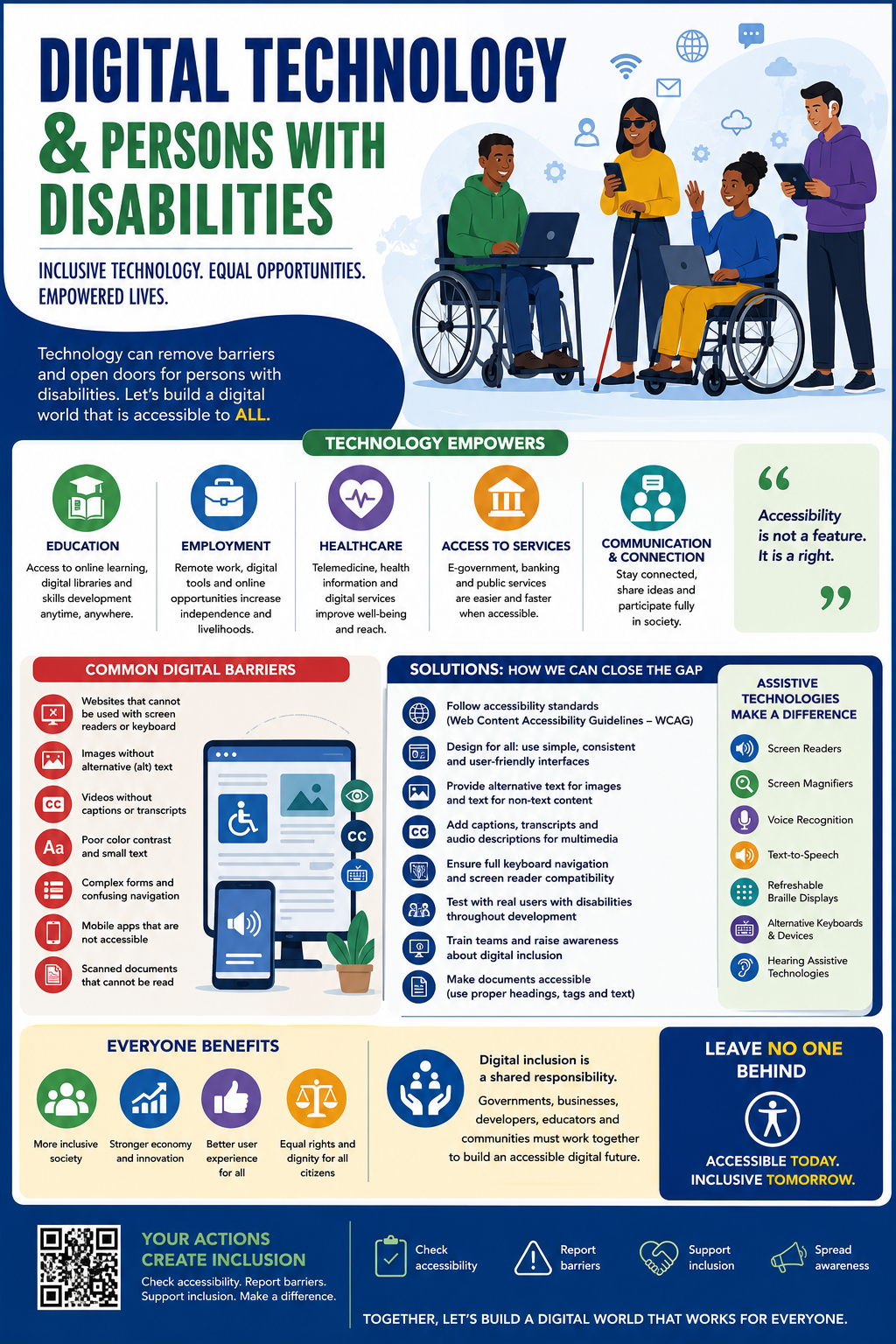
Digital transformation has fundamentally changed how societies operate. Government services are moving online, businesses increasingly rely on digital platforms, education is delivered through virtual classrooms, and healthcare providers use telemedicine and electronic records.
For persons with disabilities, these innovations can increase independence and participation. However, inaccessible websites, applications, kiosks, and digital documents can create significant obstacles that prevent equal access.
Digital inclusion means ensuring that every person—regardless of physical, sensory, cognitive, intellectual, or communication ability—can use technology safely, independently, and effectively.
2. Understanding Digital Accessibility
Digital accessibility refers to the practice of designing and developing technology so that people with diverse abilities can perceive, understand, navigate, interact with, and contribute to digital environments.
Accessibility applies to:
- Websites
- Mobile applications
- Computer software
- Online forms
- E-learning platforms
- Digital documents
- Self-service kiosks
- Banking systems
- Video conferencing tools
- Social media platforms
- Public information displays
3. The Importance of Technology for Persons with Disabilities
Technology enables persons with disabilities to:
- Access education remotely.
- Work from home or in hybrid environments.
- Communicate using alternative methods.
- Receive healthcare consultations online.
- Access financial services.
- Apply for jobs independently.
- Participate in civic and government processes.
- Engage in entrepreneurship and digital commerce.
- Connect socially and professionally.
- Access emergency information more quickly.
4. Categories of Disabilities and Their Digital Needs
Visual Disabilities
Needs include:
- Screen reader compatibility
- Keyboard navigation
- Alternative text for images
- Braille device support
- Adjustable font sizes
- High-contrast displays
Hearing Disabilities
Needs include:
- Closed captions
- Sign language interpretation
- Visual notifications
- Live transcription
- Text-based communication channels
Physical or Motor Disabilities
Needs include:
- Voice control
- Keyboard-only operation
- Switch devices
- Eye-tracking systems
- Larger clickable targets
- Flexible input methods
Cognitive and Learning Disabilities
Needs include:
- Plain language
- Consistent navigation
- Minimal distractions
- Step-by-step instructions
- Easy-to-read layouts
- Visual aids and icons
Speech Disabilities
Needs include:
- Text chat alternatives
- Augmentative and alternative communication tools
- Email and messaging options
- Non-verbal authentication methods
5. Benefits of Digital Inclusion
Economic Benefits
- Higher workforce participation
- Expanded customer base
- Increased productivity
- Reduced dependency on physical services
Social Benefits
- Greater independence
- Improved social participation
- Enhanced communication
- Reduced isolation
Educational Benefits
- Equal learning opportunities
- Accessible digital libraries
- Personalized learning experiences
- Remote participation
Government Benefits
- More inclusive public services
- Better citizen engagement
- Reduced administrative costs
- Improved service efficiency
6. Current Accessibility Gaps
Despite advances in technology, many barriers remain.
Website Accessibility
Many websites:
- Lack alternative text for images.
- Cannot be navigated by keyboard.
- Use inaccessible menus.
- Contain poorly labeled forms.
Mobile Applications
Many apps:
- Ignore screen reader support.
- Have tiny touch targets.
- Use gestures that exclude some users.
- Lack scalable interfaces.
Digital Documents
Many PDFs:
- Are scanned images without readable text.
- Lack heading structures.
- Have inaccessible tables.
- Cannot be interpreted by assistive technologies.
Multimedia
Common problems include:
- Missing captions.
- No transcripts.
- Poor audio quality.
- Lack of audio descriptions.
Authentication Systems
Some verification methods rely only on visual CAPTCHAs or fine motor interactions, creating unnecessary barriers.
7. Common Barriers Across Sectors
Education
- Inaccessible learning management systems
- Uncaptioned lectures
- Poorly formatted course materials
Employment
- Inaccessible recruitment portals
- Non-inclusive workplace software
- Limited accommodations
Banking
- ATMs without accessibility features
- Mobile banking apps incompatible with assistive technology
- Complex authentication procedures
Healthcare
- Inaccessible appointment systems
- Telemedicine platforms lacking captions
- Digital records not designed for assistive technologies
Public Services
- Online forms that cannot be completed using keyboards
- Self-service kiosks without audio guidance
- Websites incompatible with screen readers
8. Sector-by-Sector Analysis
Education
Digital classrooms should support captions, accessible documents, keyboard navigation, and screen readers.
Employment
Recruitment systems should allow applicants using assistive technologies to complete every stage of the hiring process independently.
Healthcare
Patient portals should use accessible forms, readable interfaces, and multiple communication options.
Banking
Financial institutions should ensure secure yet accessible authentication and provide alternatives for users with varying abilities.
Government
Digital government services should be usable by all citizens without requiring assistance, ensuring equal participation in public life.
9. Assistive Technologies
Examples include:
- Screen readers
- Refreshable Braille displays
- Screen magnifiers
- Speech recognition software
- Text-to-speech systems
- Speech-generating devices
- Eye-tracking technology
- Alternative keyboards
- Adaptive mice
- Voice assistants
- Hearing aid integrations
- Live captioning software
10. Best Practices for Inclusive Design
Developers and organizations should:
- Use semantic HTML and accessible coding practices.
- Ensure complete keyboard navigation.
- Maintain sufficient color contrast.
- Avoid relying solely on color to convey meaning.
- Label form fields clearly.
- Provide descriptive alternative text.
- Include captions and transcripts.
- Support text resizing without breaking layouts.
- Make error messages understandable and actionable.
- Test with real users who have disabilities.
11. Organizational and Government Responsibilities
Organizations should:
- Adopt accessibility policies.
- Conduct regular accessibility audits.
- Train staff on inclusive design.
- Include accessibility in procurement requirements.
- Budget for accessibility improvements.
- Appoint accessibility champions or committees.
Governments should:
- Embed accessibility into digital transformation programs.
- Enforce accessibility requirements in public procurement.
- Promote accessible digital literacy initiatives.
- Support innovation in assistive technology.
- Encourage collaboration with disability organizations.
12. Gap Analysis and Solutions
| Gap | Impact | Recommended Solution |
|---|---|---|
| Inaccessible websites | Excludes users with visual or motor disabilities | Adopt recognized accessibility standards and perform routine audits |
| Missing captions | Prevents access for deaf or hard-of-hearing users | Caption all video and live-streamed content |
| Scanned PDFs | Incompatible with screen readers | Publish tagged, text-based documents |
| Poor color contrast | Difficult for users with low vision | Use accessible color combinations and allow customization |
| Mouse-only navigation | Excludes keyboard users | Ensure full keyboard accessibility |
| Complex forms | High abandonment rates | Simplify layouts and provide clear instructions |
| Small buttons | Difficult for users with limited dexterity | Increase target sizes and spacing |
| Visual-only CAPTCHAs | Blocks some users | Offer accessible alternatives such as audio or logic-based verification |
| Limited staff awareness | Accessibility issues persist | Deliver ongoing accessibility training |
| No user testing | Hidden usability barriers remain | Involve persons with disabilities throughout design and testing |
13. Measuring Accessibility
Organizations should monitor:
- Accessibility compliance rates
- User satisfaction
- Keyboard navigation success
- Caption availability
- Screen reader compatibility
- Document accessibility
- Mobile accessibility
- Accessibility-related support requests
- Audit findings and remediation timelines
14. Emerging Technologies
Artificial intelligence and related technologies can improve accessibility through:
- Automatic image descriptions
- Real-time caption generation
- Voice interfaces
- Predictive text assistance
- Intelligent document summarization
- Smart navigation aids
- Translation into sign language avatars (where appropriate)
These technologies should be tested carefully to ensure reliability and avoid introducing new forms of exclusion.
15. Recommendations
For Governments
- Integrate accessibility into all digital service projects.
- Require accessibility compliance in procurement.
- Conduct periodic accessibility assessments.
- Support nationwide digital literacy initiatives for persons with disabilities.
For Businesses
- Design products with accessibility from the outset.
- Include accessibility testing in quality assurance.
- Train development and content teams.
- Provide multiple customer support channels.
For Educational Institutions
- Publish accessible learning materials.
- Caption educational videos.
- Offer assistive technologies to learners.
- Train educators in inclusive digital practices.
For Software Developers
- Follow accessibility standards throughout the software development lifecycle.
- Test with assistive technologies and real users.
- Document accessibility features clearly.
- Address accessibility issues as part of regular maintenance.
16. Conclusion
Digital technology has the potential to empower persons with disabilities by expanding access to education, employment, healthcare, financial services, and public participation. However, inaccessible design remains a significant barrier in many digital environments.
Closing these gaps requires a commitment to inclusive design, ongoing accessibility testing, meaningful engagement with persons with disabilities, and policies that make accessibility a core requirement rather than an optional enhancement. When accessibility is embedded from the beginning, technology becomes a tool for equity, independence, and opportunity—benefiting not only persons with disabilities but society as a whole.




Leave a Comment